Keyboard shortcuts
Aletheia is fast to drive from the keyboard. Two ideas cover most of it: a global command palette, and single-key surface navigation.
The essentials
| Shortcut | Action |
|---|---|
| Cmd+K / Ctrl+K | Quick find / command palette — jump to any note, entity, tag, or command |
| Cmd+P / Ctrl+P | Quick switcher — jump between recent notes |
| Cmd+F / Ctrl+F | Find in note — search (and replace) within the open note |
Surface navigation (single keys)
When no text field is focused, single letters jump between surfaces:
| Key | Goes to |
|---|---|
| E | Editor |
| S | Search |
| C | Chat |
| , | Settings |
Because these fire only when you're not typing, they never collide with writing a note.

The command palette in depth
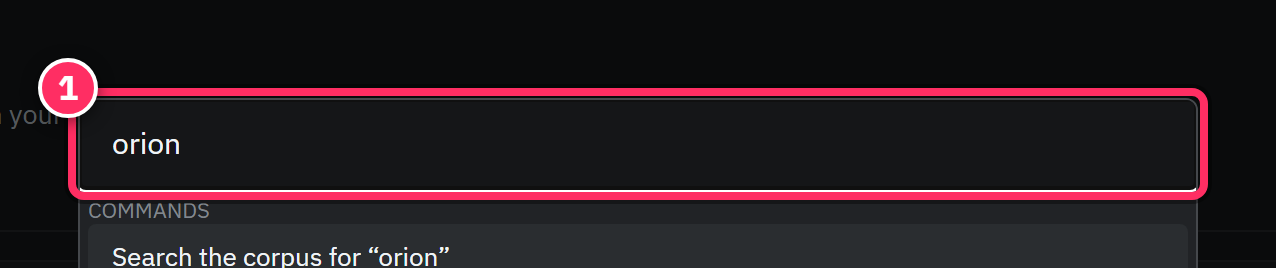
Cmd+K (or Ctrl+K) is the one to internalize. It opens a search-anything overlay:
- Type to search notes, entities, tags, and commands simultaneously.
- Up / Down to move, Enter to select, Esc to close.
- Results are grouped by type, so a note, a person, and a command are all reachable from the same keystroke.
In the editor
| Shortcut | Action |
|---|---|
| Cmd+F / Ctrl+F | Open find/replace in the note |
| Markdown syntax | # heading · - bullet · 1. numbered · > quote · |
| Esc | Close an open overlay / find bar |
Learn two keys, not twenty
If you internalize only Cmd+K (go anywhere) and the single-key surface jumps (E / S / C), you'll navigate Aletheia faster than most people navigate their file system. Everything else is discoverable from the command palette itself.